


SFP & SFP+ Optical Transceiver Guide
Search and shortlist industrial transceivers by speed, media, reach, connector, operating temperature and DDM support.
Start SelectionSFP vs. SFP+Find the SFP You Need
Match the host port and data rate first, then confirm media, reach, connector and environment.
Verify specifications, host compatibility, optical budget, availability, and BiDi wavelength pairing before selection.
SFPMXT1AC
100MEX-LM38-A3S-TC-N-B3
100MEX-LM48-A3S-TC-N-B5
100MEX-0155TBP-MB5L
100MEX-0155TBP-LB5L
100MSFPMIM02C
100MSFPMSS15C
100MEX-0155TSP-MB6L
100MEX-LM38-A3S-TI-N-B3
100MEX-LM48-A3S-TI-N-B5
100MSFPMYS20M
100MSFPMZS20M
100MEX-0155TBP-MB6L-A
100MEX-0155TBP-KB6L-A
100MSFPMIM02M
100MSFPMIS20M
100MEX-0155TSP-MB6L-A
100MEX-1250TBP-MB1LS
1GEX-1250TBP-LB1LS
1GEX-1250TBP-MB4LS
1GEX-1250TBP-KB4LS
1GEX-1250TBP-MB5LS
1GEX-1250TBP-KB5LS
1GEX-LS38-C3L-TC-N-CE
1GEX-LS48-C3L-TC-N-CE
1GEX-LS38-C3U-TC-N-CE
1GEX-LS48-C3U-TC-N-CE
1GSFPGIM5AC
1GSFPGIM02C
1GEX-1250TSP-MB4LS
1GSFPGIS10C
1GEX-1250TSP-MB5LS
1GEX-LS38-C3L-TC-N-EB
1GEX-LS48-C3U-TC-N-EB
1GSFPGIS90C
1GSFPGXT1AM
1GEX-1250TBP-MB1L-AS
1GEX-1250TBP-LB1L-AS
1GEX-LM38-C3S-TI-N-CE
1GEX-LM48-C3S-TI-N-CE
1GEX-1250TBP-MB4L-AS
1GEX-1250TBP-KB4L-AS
1GEX-1250TBP-MB5L-AS
1GEX-1250TBP-KB5L-AS
1GSFPGYS20M
1GSFPGZS20M
1GEX-LS38-C3L-TI-N-CE
1GEX-LS48-C3L-TI-N-CE
1GEX-LS38-C3U-TI-N-CE
1GEX-LS48-C3U-TI-N-CE
1GSFPGIM5AM
1GSFPGIM02M
1GSFPGIS10M
1GSFPGIS20M
1GSFPGIS40M
1GSFPGIS70M
1GSFP2IM2AM
2.5GSFP2IS20M
2.5GSFP2XT1AM
2.5GSFPTIM3AE
10GSFPTIS10E
10GSFPTIS20C
10GSFPTIS40C
10GSFPTIM3AM
10GSFPTIS10M
10GSFPTIS20M
10GSFPTIS40M
10GSFPTXT1AM
10GTry removing a filter or contact EtherWAN.
SFP or SFP+ starts with the host port.
| Selection point | SFP | SFP+ |
|---|---|---|
| Typical data rate | 100M, 1G and selected 2.5G links | 10G links; selected dual-rate ports also support 1G |
| Typical use | Access, edge and industrial fiber links | High-bandwidth uplinks and aggregation backbones |
| Fiber options | Multimode, single-mode and selected single-fiber BiDi modules | Multimode and single-mode modules in this guide |
| Connector | Duplex LC, single LC for BiDi and selected RJ45 | Duplex LC and selected RJ45 |
| Compatibility rule | Confirm the supported SFP speed and module list | Confirm whether the SFP+ port supports 1G, 10G or both |
Six checks prevent most fiber-link mistakes.
After confirming the host port and speed, verify the media, connector, wavelength, reach, operating environment and DDM.
DDM reveals link health before failure.
When both the transceiver and host support Digital Diagnostic Monitoring, maintenance teams can observe operating conditions remotely.
Where EtherWAN transceivers fit.
Supported speeds and port configurations differ by model.
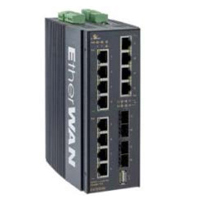
EX78900E Series
2 or 4 × dual-rate 100/1000BASE SFP uplink ports
- DIN-rail industrial PoE platform
- Hardened SFP options available
- Confirm the exact ordering model
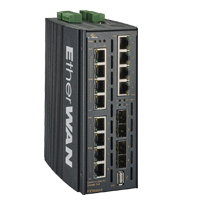
EX78900X Series
4 × dual-rate 1G/10G SFP+ uplink ports
- High-bandwidth aggregation
- Hardened 1G and 10G module options
- Match the module to the configured port speed
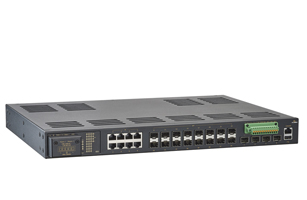
IG5 Rack Series
4 × dual-rate 1G/10G SFP+ uplinks; selected models add up to 24 × 100/1000BASE SFP ports
- IEC 61850-3 and IEEE 1613
- Multiple copper and fiber configurations
- Confirm the exact IG5 ordering configuration
Frequently asked questions
Can an SFP be used in an SFP+ port?
Only when the host documentation explicitly supports the module and data rate. Physical fit alone is not enough.
When should I choose a hardened transceiver?
When the expected module temperature may fall outside a controlled indoor range. EtherWAN hardened models shown here are specified for -40 to 85°C.
What does DDM monitor?
Temperature, voltage, laser bias current, TX power and RX power on supported modules and hosts.
Do BiDi transceivers need to be paired?
Yes. The modules at opposite ends require complementary transmit and receive wavelengths.
Does longer reach always mean better?
No. The optical power range must fit the actual link loss; excessive receive power can also cause problems.
Confirm compatibility before specifying the link.
Share the switch model, port speed, fiber type, distance and operating environment with EtherWAN.
Ask an EngineerView Full Specifications


